

VIP Club
Top-tier Perks & Rewards!

 BackSearch results

Top-tier Perks & Rewards!
Every great explorer needs a map, and this is yours. From tier perks to bonus paths, your VIP journey is all laid out here.
Ready to level up? Scroll down to see what’s coming; your next milestone might be just a spin away.

Qualification: Registration

Every explorer starts with a hidden map. Unlock your Welcome Journey Pack and discover the surprises Ryan has stashed for you.

— Your Starter Welcome Gear for the Journey. See the full scoop here.
— Ryan Says Never a Dull Moment Here
— Real People, Always Ready To Help

Want to make a deposit without typing in card numbers? Red Stag Casino supports CardPay, a secure checkout that lets you fund your account with Google Pay, Cash App, Apple Pay, or a regular credit or debit card. If you can buy a coffee with your phone, you can make a deposit here.
⚡ Fast & easy · 💵 Higher limits · ✅ Higher acceptance · 🔒 Wallet-secured checkout
This guide walks through the whole flow with real screenshots, from clicking Deposit to confirming your payment.
Not in the mood to read? Watch the quick guide instead!
Ready to try it? Open the cashier and follow along - you'll be done in about two minutes.
CardPay is a payment gateway that works like any online checkout: you pick an amount, choose how to pay, and confirm. You pay in US dollars - $25 means $25 - and your balance is credited in US dollars. Your Apple Pay, Google Pay, or Cash App wallet or card does all the work.
A typical deposit takes about two minutes.
One important rule before you start: payments must be made in your own name. Transactions are only processed in the name of the registered account holder, so use your own wallet or card.
Step 1: Click "Deposit"
Log into your Red Stag Casino account and click the yellow Deposit button in the top-right corner.

Step 2: Select the Wallet Payment Method
The cashier opens with your available deposit methods. Look for the wallet tile - it cycles through the Apple Pay, Google Pay, and CardPay logos, but it's all one payment method. Whichever logo is showing when you look, select that tile and click Continue.
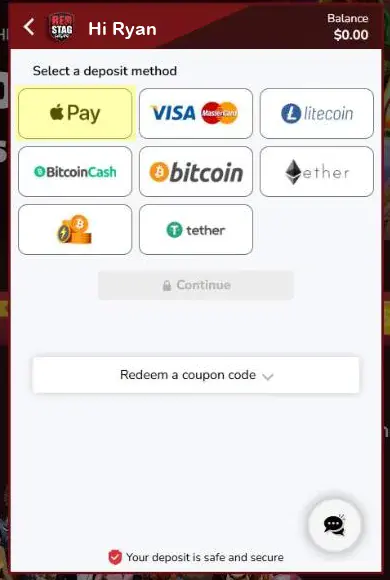
The tile rotates through these three logos - it's the same button no matter which one is showing:

Note: Don't worry if your tile shows a different logo than the screenshot - Apple Pay, Google Pay, and CardPay all open the same secure checkout.
Step 3: Choose Your Amount
You're now on the CardPay tab of the cashier. Pick one of the preset amounts or click Other to enter your own. The minimum deposit is shown right on this screen (typically $10).
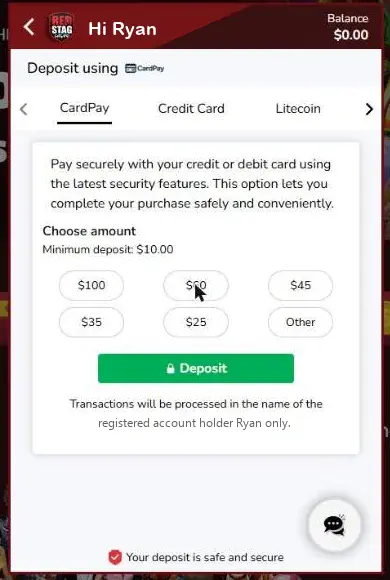
Once you select an amount, the green button updates - click Deposit to continue.
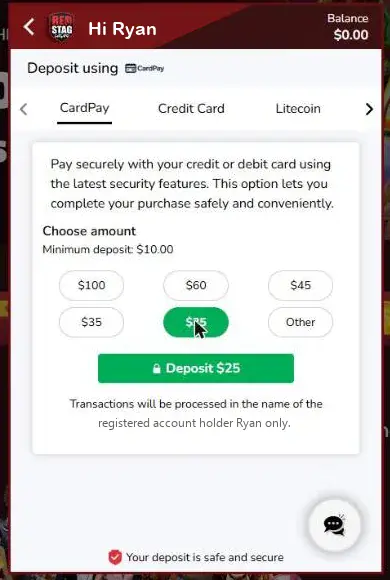
Step 4: Pick Your Bonus
Before payment, the cashier shows any bonus you qualify for. You can Claim the offer, redeem a coupon code, or select I don't want a bonus to deposit without one.
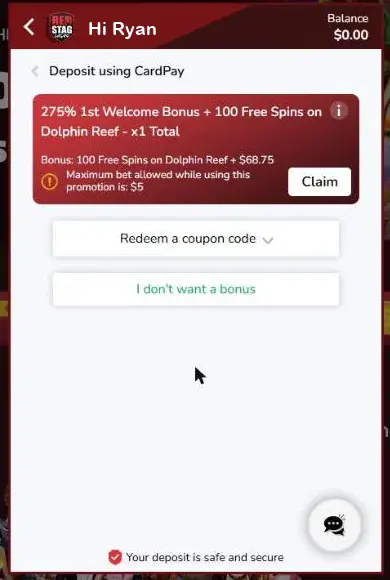
Tip: Check the bonus terms before claiming - promotions can carry a maximum bet limit while active.
Step 5: Confirm the Amount in CardPay
The CardPay window opens inside the cashier. Confirm your deposit amount (you'll see the full range of available amounts here), then click Confirm.
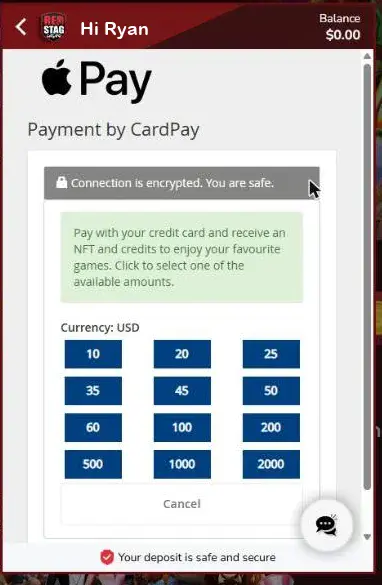
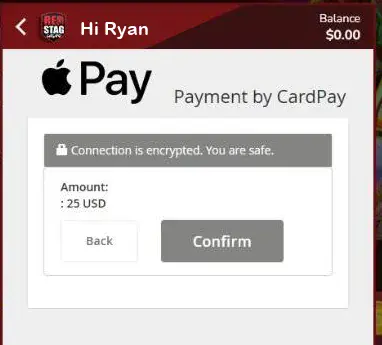
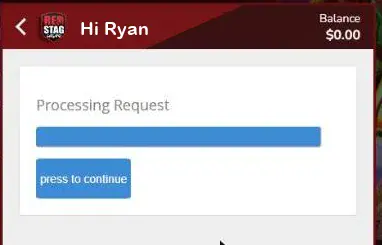
After a brief "Processing Request" screen, click press to continue - the secure checkout opens in a new tab.
Step 6: Review the Secure Checkout
You're now in CardPay Secure Checkout. It shows exactly what you're paying - for example, $25. Note the session timer in the top corner: you have about 10 minutes to complete the payment before the session expires.
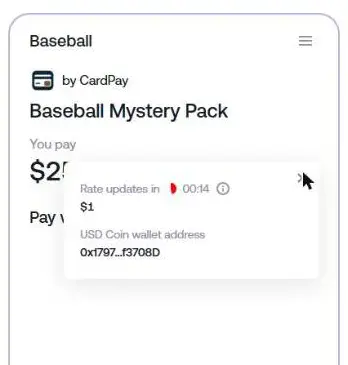
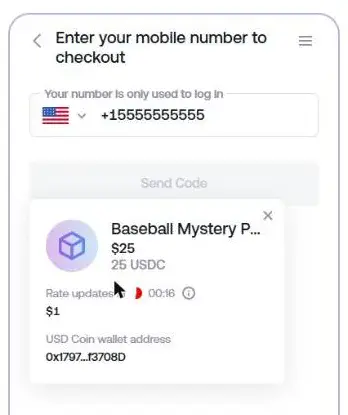
You'll notice the checkout mentions 25 USDC and a collectible "Mystery Pack". That's just how CardPay moves your money behind the scenes: it runs on secure crypto rails, so your dollars purchase digital credits (USD Coin) worth exactly what you pay - at 1:1 - and those credits fund your Red Stag Casino balance. You never need a crypto wallet, and you never handle crypto yourself.
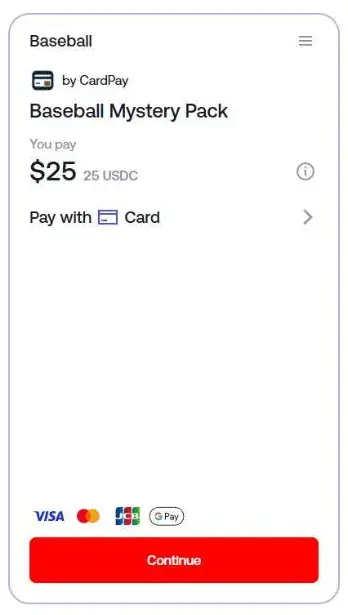
You can click the small info icon next to the amount to see the live conversion rate and the behind-the-scenes transaction details:
Step 7: Choose How to Pay
Click the Pay with row to see your payment options:
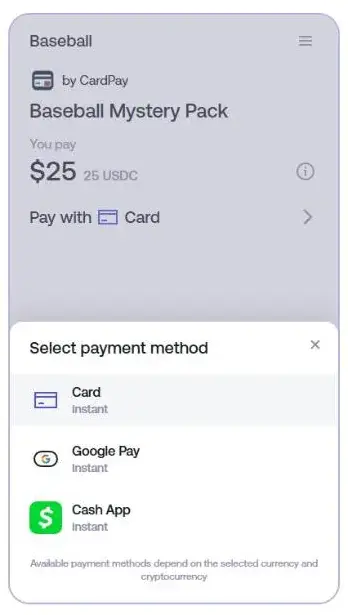
Where's Apple Pay? Payment options adapt to your device. Apple Pay appears when you check out from an iPhone, iPad, or Mac using Safari. On other devices you'll see Google Pay and Cash App instead.
Select your method - the checkout updates to show your choice:
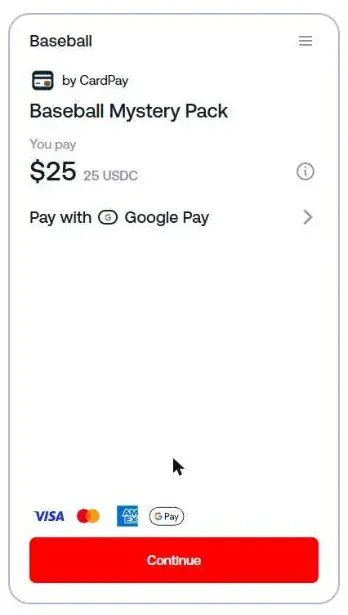
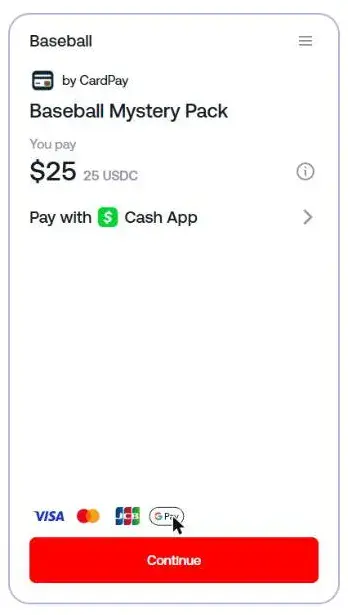
Then click Continue.
Step 8: Verify Your Phone Number
The first time you use CardPay, you'll be asked for your mobile number. This is a one-time login step - the number is only used to secure your checkout session. Enter your number and click Send Code, then type in the code from the text message you receive.
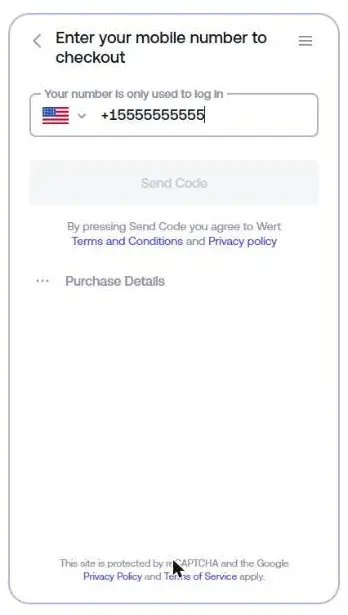
You can review your order anytime via Purchase Details:
Step 9: Complete the Payment
After verification, finish the payment with your chosen method:
Step 10: You're Funded
Once the payment is approved, you're returned to Red Stag Casino and your balance updates with your deposit - plus any bonus you claimed in Step 4. Time to play!
Your turn: head to the cashier and make your first CardPay deposit - you now know every screen you'll see along the way.
What is CardPay?
CardPay is the secure checkout Red Stag Casino uses for wallet-based deposits. It lets you fund your account with Google Pay, Cash App, Apple Pay, or a credit/debit card, converting your dollars into casino credits at 1:1.
Why does the checkout mention a "Mystery Pack" and USDC?
CardPay processes your payment over secure crypto rails. Your dollars purchase USD Coin credits (worth exactly what you pay) plus a digital collectible pack, and your casino balance is funded from that. You don't need a crypto wallet and you never handle crypto yourself.
What's the minimum deposit?
The minimum is displayed on the amount screen in the cashier - typically $10.
Why do I need to enter my phone number?
The secure checkout uses a one-time SMS code to protect your session. Your number is only used for this login.
Why don't I see Apple Pay at checkout?
Apple Pay is only offered on Apple devices (Safari on iPhone, iPad, or Mac). On Windows or Android you'll see Google Pay and Cash App instead.
Can I claim a bonus with a CardPay deposit?
Yes. The bonus step appears during the deposit flow - claim the offer, enter a coupon code, or skip it.
Can I use someone else's card or wallet?
No. Transactions are only processed in the name of the registered account holder.
If you run into any issues, our support team is here 24/7:
A CardPay deposit takes about two minutes once you've done it once. Pick your amount, tap your wallet, and you're back to the games.
Bonuses at Red Stag Casino
Any bonuses you receive at Red Stag Casino will be added to a bonus balance ('Bonus Account') that is maintained separately from any cash or real funds ('Real Account') that you may have.
You can see both accounts listed in the bottom left-hand corner of the casino at all times
Restrictions
The Bonuses will be given only once per household and/or per account, as per our terms of use. If a second account is opened, it will be closed and all bonuses and winnings will be
If you already have multiple accounts you are NOT eligible for multiple bonuses in your additional accounts. Any player attempting to claim multiple bonuses for which they are not eligible will have his/her account closed and any winnings on all his/her accounts will be null and void. All cash-ins will be
Each promotional offer is available only once per person, family, household address, email address, credit card number, and environments where computers are shared (university, fraternity, school, public library, workplace, etc).
You cannot claim another bonus offer unless you have a play balance of less than $100.
Deposit bonuses can be claimed only within 48 hours from the time the deposit was made.
The minimum deposit to qualify for deposit offers is $25.00 unless otherwise stipulated.
Players with one or more pending withdrawals currently in their account are not eligible to receive any bonuses, promotional or
Only one Real Account is allowed per player, household, address, e-mail address, credit card number, bank account, and environments where computers are shared (university, fraternity, school, public library, workplace, etc)
Players excluded from redeeming bonuses cannot enter any tournaments.
All bonuses at Red Stag Casino have a minimum
To play with the Welcome Bonus or to withdraw the bonus as part of your winnings, please note that you will need to fulfill a wagering requirement of thirty (30) times the combined value of the purchase and bonus before you can do so.
The maximum wager per single bet that is permitted, if playing with any portion of a welcome bonus, is 5$ and 10$ if playing with any other type of (non-welcome) bonus. Players placing wagers using bonus balance funds attached to rules, in excess of this maximum will forfeit all winnings after the max bet point.
The maximum wager per single bet that is permitted for Sweden, and Mauritius customers using any portion of a bonus is $5.00.
Tournament prizes that are paid in the form of bonus credits are subject to 20x wagering requirements.
Registering and or Rebuying to a tournament
All free spin bonuses have a Wagering Requirement of 40x unless otherwise stipulated.
Freeroll Tournaments and Tournaments are only for active depositing customers. Access to tournaments may be denied to customers who have not deposited in the casino for 30 days or more.
Please note that you are not able to accumulate bonuses: Each bonus must be used in its entirety before any additional bonuses can be issued. Players attempting to claim multiple bonuses will forfeit any winnings from their account.
Bonus programs are intended for recreational bettors only. Professional players or players considered to be abusing a bonus system and/or
Play that may be subjected to such sanctions includes but is not limited to using zero-sum bets, Martingale, double-up, and similar systems and strategies.
A 50% bonus is listed as having a Wagering Requirement of 20x (Bonus+Deposit). If you purchase $50 in credits and claim this bonus, you will receive an additional 50% ($25 - half your deposit) in bonus funds. The $25 bonus will be added to your Bonus Account, and the $50 you purchased will be added to your Real Account. You now have a total of $75 to play with. The Wagering Requirement in this instance is 20x(25+50) (Bonus+Deposit) = 20x75 = $1,500. You will be required to wager a minimum of $1,500 before you can withdraw any of the funds associated with this bonus.
Not all wagers on all games count equally towards meeting any Wagering Requirement.
Please review the table below for details.
For example:
| Wagers on | Count |
| Any slot game | 100% |
| Keno | 100% |
| Poker Slots | 100% |
| Baccarat | 0% |
| Any Blackjack game | 10% |
| Craps | 0% |
| Any Roulette game | 0% |
| Any Video Poker game | 10% |
| All other Table games | 35% |
All withdrawals will be subject to audit before being processed. If you request a withdrawal before your associated wagering requirements have been met, we will inform you by email within 24-48 hrs by Auditing Department. The Casino reserves all rights to void bonuses or any winnings for failed audits.
If your combined Bonus Account and Account balance are less than $1.00, any Wagering Requirements associated with your account are removed as soon as a deposit or a new bonus is claimed. In order to prevent legacy Wagering Requirements from being applied, we recommend that you do not accept additional bonuses if your account balance is higher than this minimum.
Players choosing to deposit using eWallets such as NETeller or Skrill (MoneyBookers) are not eligible to redeem any bonus in excess of 49% of the related deposit.
Roulette, Craps,
Certain games do not permit wagers from the bonus balance.
Any bets you place will be taken from your bonus
Bonuses, of any kind, cannot be combined on the same deposit with any other
Unless otherwise stated, players' maximum cashout on winnings coming from free money offers, Bi-Monthly free bonus, comp points, free spins, and tournament winnings is $160.00, or AUD$250 for Australian customers (There must be deposit activity in between each free money cashout). The Maximum cashout from the Martini Weekly Cashback is $160 (or AUD$250 for Australian customers) or double the amount of cashback received, whichever is higher, up to $2,400. Any remaining balance will be removed from the account. Non-depositing and inactive players for more than 1 month can only cashout once from free money or tournament winnings.
Deposit bonuses must be claimed by the player via the cashier or from our representatives when credits are purchased, or before the player
Bonuses may be refused at the discretion of the management if abuse of promotions is suspected. All withdrawals will be audited and refused where there is suspected fraud at the casino management's discretion.
The Company reserves the right to amend these Terms and Conditions at any time without notice to you. Such amendments will be effective immediately upon being posted in this "Terms and Conditions" section of the
Any promotion or offer is terminable at any time in accordance with the views of management without prior notice or obligation.
Free Bonuses
If you receive a free bonus, a non-deposit bonus, a bonus that does not require you to make an associated purchase of casino credits, for any reason, please ensure you are aware of the following terms:
• All non-deposit bonuses have a Wagering Requirement of 40x unless otherwise stipulated.
• All free spin bonuses have a Wagering Requirement of 40x unless otherwise stipulated.
• All non-deposit players with tournament winnings have a Wagering Requirement of 40x unless otherwise stipulated.
• The wagering of any portion of a non-deposit bonus on non-slot games is forbidden unless specifically noted otherwise.
• If a customer has never deposited and you receive a non-deposit bonus or tournament winnings, you will be limited to a one-time withdrawal allowance of $160, or AUD$250 for Australian customers. In the event that your winnings exceed the specified limit and you choose to request a withdrawal, the additional funds will be deducted from your account.
• You may only register one account at Red Stag Casino. Players opening multiple accounts for the purpose of claiming free bonuses will have all accounts closed and any funds will be deducted.
•The maximum individual wager permitted using any portion of Free Bonus is $5.00 Players placing wagers using balance funds attached to bonus rules, in excess of this maximum will forfeit all winnings after the max bet point.
•Management determines the maximum number of free trial chips and tournaments that a new player can claim, and said limitation could change at any given point without prior notification.
Bonus rules apply

This isn’t just a bonus. It’s your invitation to play like you’ve always wanted to; bold, free, and on your own terms. At Red Stag, we don’t do gimmicks. We do grit, style, and real rewards for players who show up ready to explore.
Whether you’re in it for the thrill, the escape, or the shot at something bigger, your welcome offer is built to match. Deposit, play, and see where the trail takes you. Every spin’s a story. This one’s yours.
Think of this offer as your basecamp. From here, you’ll unlock spins, perks, and a stash of bonus ammo as you explore our most immersive games.
We’ve lined the trail with options: high-volatility hits for daredevils, low-stakes favorites for deep-play explorers, and a few wildcard picks Ryan swears by.
Each step you take unlocks a new reward. These bonuses aren’t random; they’re crafted to guide your journey from first deposit to seasoned explorer.
Below, you’ll find what’s waiting at every stop along the way. No choices, no confusion, just follow the trail and collect your bonuses as you go.
| Deposit # | Bonus | Max Bonus |
|---|---|---|
| 1st | 275% + 100 Free Spins on Dolphin Reef | $550 |
| 2nd | 175% + 100 Free Spins on Fat Cat | $350 |
| 3rd | 100% + 50 Free Spins on Funky Chicken | $200 |
| 4th | 175% + 50 Free Spins on Cool Bananas | $350 |
| 5th | 100% + 25 Free Spins on City of Gold | $200 |
| 6th | 150% + 25 Free Spins on Cherry Blossom | $300 |
| 7th | 275% + 150 Free Spins on King Tiger | $550 |
Min deposit to qualify: $25.
Bonuses at Red Stag Casino
Any bonuses you receive at Red Stag Casino will be added to a bonus balance ('Bonus Account') that is maintained separately from any cash or real funds ('Real Account') that you may have.
You can see both accounts listed in the bottom left-hand corner of the casino at all times
Restrictions
The Bonuses will be given only once per household and/or per account, as per our terms of use. If a second account is opened, it will be closed and all bonuses and winnings will be
If you already have multiple accounts you are NOT eligible for multiple bonuses in your additional accounts. Any player attempting to claim multiple bonuses for which they are not eligible will have his/her account closed and any winnings on all his/her accounts will be null and void. All cash-ins will be
Each promotional offer is available only once per person, family, household address, email address, credit card number, and environments where computers are shared (university, fraternity, school, public library, workplace, etc).
You cannot claim another bonus offer unless you have a play balance of less than $100.
Deposit bonuses can be claimed only within 48 hours from the time the deposit was made.
The minimum deposit to qualify for deposit offers is $25.00 unless otherwise stipulated.
Players with one or more pending withdrawals currently in their account are not eligible to receive any bonuses, promotional or
Only one Real Account is allowed per player, household, address, e-mail address, credit card number, bank account, and environments where computers are shared (university, fraternity, school, public library, workplace, etc)
Players excluded from redeeming bonuses cannot enter any tournaments.
All bonuses at Red Stag Casino have a minimum
To play with the Welcome Bonus or to withdraw the bonus as part of your winnings, please note that you will need to fulfill a wagering requirement of thirty (30) times the combined value of the purchase and bonus before you can do so.
The maximum wager per single bet that is permitted, if playing with any portion of a welcome bonus, is 5$ and 10$ if playing with any other type of (non-welcome) bonus. Players placing wagers using bonus balance funds attached to rules, in excess of this maximum will forfeit all winnings after the max bet point.
The maximum wager per single bet that is permitted for Sweden, and Mauritius customers using any portion of a bonus is $5.00.
Tournament prizes that are paid in the form of bonus credits are subject to 20x wagering requirements.
Registering and or Rebuying to a tournament
All free spin bonuses have a Wagering Requirement of 40x unless otherwise stipulated.
Freeroll Tournaments and Tournaments are only for active depositing customers. Access to tournaments may be denied to customers who have not deposited in the casino for 30 days or more.
Please note that you are not able to accumulate bonuses: Each bonus must be used in its entirety before any additional bonuses can be issued. Players attempting to claim multiple bonuses will forfeit any winnings from their account.
Bonus programs are intended for recreational bettors only. Professional players or players considered to be abusing a bonus system and/or
Play that may be subjected to such sanctions includes but is not limited to using zero-sum bets, Martingale, double-up, and similar systems and strategies.
A 50% bonus is listed as having a Wagering Requirement of 20x (Bonus+Deposit). If you purchase $50 in credits and claim this bonus, you will receive an additional 50% ($25 - half your deposit) in bonus funds. The $25 bonus will be added to your Bonus Account, and the $50 you purchased will be added to your Real Account. You now have a total of $75 to play with. The Wagering Requirement in this instance is 20x(25+50) (Bonus+Deposit) = 20x75 = $1,500. You will be required to wager a minimum of $1,500 before you can withdraw any of the funds associated with this bonus.
Not all wagers on all games count equally towards meeting any Wagering Requirement.
Please review the table below for details.
For example:
| Wagers on | Count |
| Any slot game | 100% |
| Keno | 100% |
| Poker Slots | 100% |
| Baccarat | 0% |
| Any Blackjack game | 10% |
| Craps | 0% |
| Any Roulette game | 0% |
| Any Video Poker game | 10% |
| All other Table games | 35% |
All withdrawals will be subject to audit before being processed. If you request a withdrawal before your associated wagering requirements have been met, we will inform you by email within 24-48 hrs by Auditing Department. The Casino reserves all rights to void bonuses or any winnings for failed audits.
If your combined Bonus Account and Account balance are less than $1.00, any Wagering Requirements associated with your account are removed as soon as a deposit or a new bonus is claimed. In order to prevent legacy Wagering Requirements from being applied, we recommend that you do not accept additional bonuses if your account balance is higher than this minimum.
Players choosing to deposit using eWallets such as NETeller or Skrill (MoneyBookers) are not eligible to redeem any bonus in excess of 49% of the related deposit.
Roulette, Craps,
Certain games do not permit wagers from the bonus balance.
Any bets you place will be taken from your bonus
Bonuses, of any kind, cannot be combined on the same deposit with any other
Unless otherwise stated, players' maximum cashout on winnings coming from free money offers, Bi-Monthly free bonus, comp points, free spins, and tournament winnings is $160.00, or AUD$250 for Australian customers (There must be deposit activity in between each free money cashout). The Maximum cashout from the Martini Weekly Cashback is $160 (or AUD$250 for Australian customers) or double the amount of cashback received, whichever is higher, up to $2,400. Any remaining balance will be removed from the account. Non-depositing and inactive players for more than 1 month can only cashout once from free money or tournament winnings.
Deposit bonuses must be claimed by the player via the cashier or from our representatives when credits are purchased, or before the player
Bonuses may be refused at the discretion of the management if abuse of promotions is suspected. All withdrawals will be audited and refused where there is suspected fraud at the casino management's discretion.
The Company reserves the right to amend these Terms and Conditions at any time without notice to you. Such amendments will be effective immediately upon being posted in this "Terms and Conditions" section of the
Any promotion or offer is terminable at any time in accordance with the views of management without prior notice or obligation.
Free Bonuses
If you receive a free bonus, a non-deposit bonus, a bonus that does not require you to make an associated purchase of casino credits, for any reason, please ensure you are aware of the following terms:
• All non-deposit bonuses have a Wagering Requirement of 40x unless otherwise stipulated.
• All free spin bonuses have a Wagering Requirement of 40x unless otherwise stipulated.
• All non-deposit players with tournament winnings have a Wagering Requirement of 40x unless otherwise stipulated.
• The wagering of any portion of a non-deposit bonus on non-slot games is forbidden unless specifically noted otherwise.
• If a customer has never deposited and you receive a non-deposit bonus or tournament winnings, you will be limited to a one-time withdrawal allowance of $160, or AUD$250 for Australian customers. In the event that your winnings exceed the specified limit and you choose to request a withdrawal, the additional funds will be deducted from your account.
• You may only register one account at Red Stag Casino. Players opening multiple accounts for the purpose of claiming free bonuses will have all accounts closed and any funds will be deducted.
•The maximum individual wager permitted using any portion of Free Bonus is $5.00 Players placing wagers using balance funds attached to bonus rules, in excess of this maximum will forfeit all winnings after the max bet point.
•Management determines the maximum number of free trial chips and tournaments that a new player can claim, and said limitation could change at any given point without prior notification.
Bonus rules apply



Did you know your spins, hands, and plays are already working for you?
At Red Stag, you earn Rewards Points on every wager — not just slots. hether you’re doubling down at the tables or cruising through reels, your gameplay adds up to something more. No exceptions. No fine print headaches.
🎁 And those points? They're not just sitting pretty.
You can redeem them for bonus funds right from the Casino Cashier — quick, smooth, and dare we say, almost as satisfying as that first sip of a top-shelf cocktail.
| Rewards Level | Wagers | Slots/Specialty | Table Games | Video Poker | Blackjack | Comps to Upgrade | Required Comps to Stay |
|---|---|---|---|---|---|---|---|
| Spin Chaser | $100 | 100 | 50 | 65 | 35 | 0 | 0 |
| Coin Tracker | $100 | 105 | 53 | 69 | 37 | 17500 | 4,000 |
| Jackpot Scout | $100 | 111 | 56 | 73 | 39 | 95000 | 13,500 |
| Treasure Seeker | $100 | 117 | 59 | 77 | 41 | 275000 | 50,000 |
| Gold Explorer | $100 | 123 | 62 | 80 | 44 | 625,00 | 100,000 |
| Diamond Agent | $100 | 130 | 66 | 84 | 46 | 1,750,00 | 250,000 |
✅ 1,000 Rewards = $1 bonus credit
✅ Redeem anytime after $25 in total bets
✅ Minimum redemption? Just 2,000 points ($2)
✅ Rewards refresh every 60 minutes
You play. You earn. You redeem.

Not every player wants to run with the herd. If you’d rather blaze your own trail, Red Stag offers a Cashback path, no upfront bonuses, no strings, just a smart second chance.
Here’s how it works: On each of your first 7 deposits, if you skip the standard Welcome Bonus and try your luck on any of our games, you’ll unlock a safety net. Should your balance hit zero, just contact Support within 48 hours — and we’ll credit 25% of that deposit back to your account.
Wager it just 30x (excluding craps, baccarat, and roulette) and you're back in the action.
This Cashback offer is made for players who know the thrill of going all-in on their own terms. There’s no need to claim a coupon — just make your deposit, play, and if luck isn’t on your side, we’ve got your back.
Skip the Welcome Bonus and take control with every deposit — up to seven times.
There are 6 levels of rewards, each with its own unique benefits. From massive deposit bonuses to tons of free spins, weekly cashback, and more, there's something for everyone.
Every trail begins here. Claim your starter gear and set off!
 $2,500 Welcome Journey Pack Weekly Deals + Surprises Super-Friendly Support
 Easy Monday: Low Wager Bonus Dedicated VIP Host
Keep the reels spinning; momentum is everything here.
Daily Pick-Me-Up: 35% All Day Trailblazer Thursday: 85% All Day Safari Saturday: 100% All Day Easy Monday: 40% Low-Wager Bonus Dedicated VIP Host
Coins pile up like milestones; don’t miss a single one.
Daily Pick-Me-Up: 40% All Day Trailblazer Thursday: 85% All Day Safari Saturday: 100% All Day Easy Monday: 50% Low-Wager Bonus Wanderlust Reload Cashback Dedicated VIP Host
Scouts chart hidden paths; the best finds are off the trail.
Daily Pick-Me-Up: 45% All Day Easy Monday: 60% Low-Wager Bonus Trailblazer Thursday: 85% All Day Safari Saturday: 100% All Day Wanderlust Reload: 10% Cashback Dedicated VIP Host
Few dig this deep; treasure shines brighter here
Daily Pick-Me-Up: 50% All Day Trailblazer Thursday: 85% All Day Safari Saturday: 100% All Day Wanderlust Reload: 15% Cashback Easy Monday: 70% Low-Wager Bonus Dedicated VIP Host
Gold isn’t just the prize; it’s your badge of honor
Daily Pick-Me-Up: 55% All Day Trailblazer Thursday: 85% All Day Safari Saturday: 100% All Day Wanderlust Reload: 20% Cashback Easy Monday: 80% Low-Wager Bonus Dedicated VIP Host
At the summit, legends play; the mountain itself gives back.
Daily Pick-Me-Up: 60% All Day Trailblazer Thursday: 85% All Day Safari Saturday: 100% All Day Wanderlust Reload: 25% Cashback Easy Monday: 90% Low-Wager Bonus Dedicated VIP Host


Click Sign Up in the top-right of the lobby, fill in your details, choose a username and password, then confirm your email. That’s it — you’re in. Need a hand? Our Support team is always ready to help.
No app, no hassle. Red Stag works smoothly in your browser, on desktop or mobile. Just bookmark the site and play from anywhere, anytime.
To keep your account secure, unlock features like withdrawals, and meet legal standards. Verification is fast — and our Support team is here if you hit any snags.
Click Forgot Your Password on the login screen. We’ll send a reset link. Didn’t get it? Check your spam folder or contact Support.
Check for typos and extra spaces. Still no luck? Try resetting your password or get in touch — we’ve got your back.
Clear your browser cookies and cache, or try another browser. If the issue sticks, let Support know and we’ll sort it out.
Click Deposit at the top right side of the homepage. Choose your method, enter the amount, and you’re set; most funds arrive instantly. Stuck? Support can guide you through.
It varies by method; some start at $5 (especially crypto like Bitcoin Lightning), others at $25. Check the Banking tab for full details.
This is just a quick security step to confirm it’s really you. It also speeds up future transactions.
If your credit card deposit doesn’t go through, there are a few things you can check before trying again.
If you’ve tried these steps and your deposit is still declined, please contact Support. They can review your transaction and advise on the next steps.
Typically under 5 minutes, depending on your wallet and network traffic. If it takes longer than 15 minutes, let us know.
To request a withdrawal, log in to your account and click on the account icon  at the top right section of the homepage. Then click on withdraw and choose your preferred payment method, enter the amount you’d like to withdraw, and follow the instructions provided. If you run into any issues, Support will be happy to guide you through the steps.
The withdrawal limits vary depending on the payment method you select. You can see the specific limits for every available method by visiting the Banking page. If you’re unsure which option works best for your needs, Support can explain the limits and help you pick the most convenient method.
Yes, some withdrawal methods include small processing fees. The exact amount depends on the payment option you choose. You can find the full breakdown of fees and limits by visiting the Banking page. If you need help understanding which option is best for you, please reach out to our Support Team.
The $2,500 Welcome Bonus is the maximum total you can earn from our seven welcome match bonuses. Each deposit unlocks a new match, and if you deposit the full qualifying amount each time, you can reach the full $2,500. To claim, make your first deposit, and select the welcome offer displayed. You can view all bonus details on the Promotions page or contact Support if you need assistance using a bonus code.
Wagering requirements, sometimes called playthrough, tell you how many times you need to bet your bonus amount before you can withdraw any winnings from it. These rules make sure bonuses are used for real play rather than instant withdrawals. You can always check the specific wagering requirements for each bonus on the Promotions page or in the bonus terms shown when selecting a bonus upon deposit. If anything seems unclear, Support can explain how it works step by step.
You can easily track your wagering (playthrough) progress in your account section. Click on the Account icon and then select "Check Wager Requirements." There, you’ll see both the total wagering required for your active bonus and the remaining amount you still need to play through before you can make a withdrawal. If you have any trouble finding this section or understanding the information displayed, our Support team will be happy to assist you.
The maximum bet limit when playing with bonus funds is $5 per spin or hand unless otherwise stated.
You can enjoy all available games while you have bonus money in your account. However, Roulette games are excluded from bonus wagering. This means that any bets placed on Roulette while a bonus is active will not count toward your wagering requirements, and any winnings from those bets will be voided. To make the most of your bonus, we recommend sticking to eligible slots and table games until your wagering requirements are complete. If you’re unsure whether a specific game qualifies, our Support team can confirm it for you.
Yes, you can withdraw your deposit bonuses once you’ve completed all the wagering requirements linked to them. For no deposit bonuses, the maximum cashout amount is $160 after the wagering requirements for that bonus have been met. To review your wagering progress, go to your account section and select Check Wager Requirements. If you have any questions about your bonus balance or cashout limits, our Support team will be happy to assist you.
Unfortunately this game is temporarily unavailable. Please check back soon
Session Expired. Please Login To Continue